PC CASE AIR PRESSURE: POSITIVE, NEGATIVE, NEUTRAL
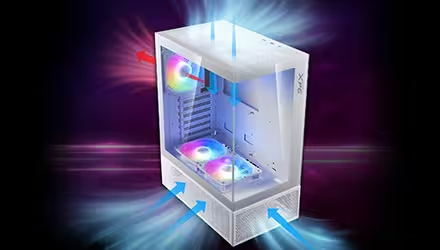
Air flows through fan vents as well as the many small gaps and openings in a PC case. Whether this air moves in or out through these openings depends on the in-case air pressure. This pressure can be positive, negative, or neutral, and affects how well your PC cools and how much dust it collects.
WHAT IS IN-CASE AIR PRESSURE?
The fans inside a PC can be set to intake (pull air into the case) or exhaust (push air out) by flipping the fan around. The overall balance between the number, size, and speed of these fans is called in-case air pressure.
In a positive-pressure setup, more air enters the PC case than leaves it because the number, size, or RPM (speed) of intake fans is higher. This extra airflow creates a pressure difference that pushes the extra air out through the case’s openings, such as those around the I/O panel.
In a negative-pressure setup, the exhaust fans are larger, faster, or more numerous, creating slightly lower air pressure inside the case. Because intake fans are not bringing in enough air to match the exhaust, outside air is drawn in through openings in the case. This causes air to flow quickly through the case, getting expelled without lingering inside.
When the intake and exhaust airflow are balanced, the PC is in a neutral-pressure setup. The air pressure inside the case is similar to the outside, so there is little to no air movement through the gaps, resulting in steady and predictable airflow.
Keep in mind that having a dust filter or mesh in front of a fan can noticeably reduce airflow. Even so, it is essential to have a dust filter in front of intake fans to control dust buildup inside the PC.

WHAT DOES EACH TYPE OF AIR PRESSURE DO?
A negative-pressure setup can give slightly better cooling as the air inside the PC gets exhausted quickly before it can get too hot. However, dust is also drawn into the PC case along with air through any gaps that are not covered by filters.
As more dust enters a negative-pressure setup, it quickly builds up on components, reducing their cooling performance. So, without regular cleaning, any cooling advantage of this setup is lost.
The main advantage of a positive-pressure setup is reduced dust buildup. Because the intake fans are covered by dust filters and no dust is being drawn in through gaps in the case, frequent cleaning is less necessary. In fact, the slight outward airflow can even carry away some of the dust particles inside the case.
However, in an overly strong positive-pressure setup where intake significantly outweighs exhaust, hot air gets trapped inside the case, causing overall temperatures to rise.
A neutral-pressure setup offers the best of both worlds. It provides predictable airflow that cools the components effectively while avoiding excessive dust buildup or trapped hot air inside the case.
WHAT IS THE RIGHT AIR PRESSURE SETUP FOR YOU?
For beginners, a neutral or a slightly positive-pressure setup is ideal. It keeps components cool while minimizing dust buildup, and most mid-range–and even some high-end–components can be easily cooled with this arrangement. A high-airflow case like VALOR AIR PRO makes achieving this setup easy.
If you plan to overclock top-of-the-line components and use AIO liquid coolers, a carefully designed airflow setup can help maximize cooling performance. A case that can mount up to 360mm radiators (at both the front and top), such as STARKER AIR BTF, is ideal for this type of high-performance cooling.