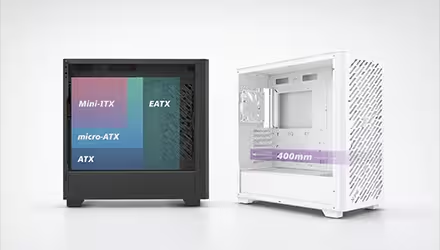
TAMAÑOS DE TARJETAS MADRE: E-ATX, ATX, MATX EXPLICADOS
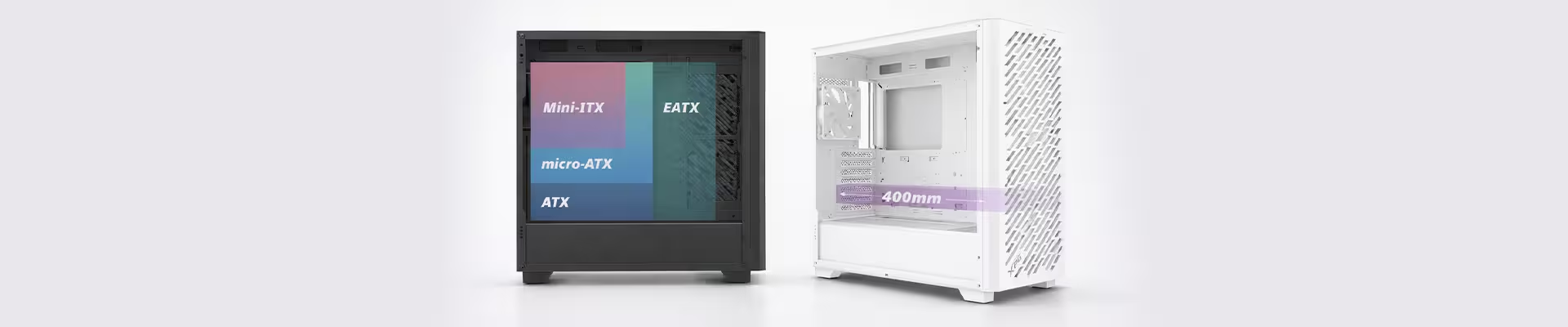
Los factores de forma de tarjeta madre más comunes son E-ATX, ATX y MicroATX (mATX).
Elegir la tarjeta madre correcta es una de las decisiones más importantes al armar una PC, ya que determina la compatibilidad con el gabinete y también influye en las características disponibles, como las ranuras de expansión, las opciones de almacenamiento y la conectividad.
Aquí tienes un resumen rápido de cada factor de forma y en qué se diferencian:
ATX
ATX es el factor de forma más utilizado en la mayoría de las PCs de consumo. Tiene un tamaño máximo estandarizado de 305 x 244 mm (12" x 9.6") y cabe en la mayoría de los gabinetes de torre media y torre completa.
Las tarjetas madre ATX están disponibles en una amplia gama de precios y características, desde modelos básicos con conectividad esencial hasta placas de gama alta con soporte para más tarjetas PCIe, almacenamiento M.2 y suministro de energía robustos.
E-ATX
Las tarjetas madre Extended ATX (E-ATX) son más grandes que las ATX estándar y suelen estar repletas de características, incluyendo conectividad avanzada y opciones de expansión. Normalmente miden alrededor de 305 x 330 mm (12" x 13"), aunque el ancho y el diseño pueden variar según el fabricante.
Las tarjetas E-ATX suelen encontrarse en servidores, estaciones de trabajo de gama alta y equipos para entusiastas. Requieren gabinetes que admitan explícitamente el formato E-ATX, como el VALOR AIR PRO, por lo que es importante verificar la compatibilidad y las dimensiones exactas del gabinete antes de comprar.
mATX
Las tarjetas madre MicroATX (mATX) tienen un tamaño máximo de 244 x 244 mm (9.6" x 9.6"), lo que las hace un poco más pequeñas que las ATX estándar.
Las tarjetas mATX se usan comúnmente tanto en montajes compactos como en gabinetes ATX tradicionales. Pueden ofrecer menos ranuras de expansión y conectores que las ATX, pero siguen brindando suficientes funciones para la mayoría de sistemas de juegos y uso general. Siempre se debe verificar la compatibilidad del gabinete y el espacio disponible para componentes (longitud de GPU, altura del disipador de CPU, soporte para radiadores), especialmente en gabinetes pequeños como la serie VALOR NANO.
Otro factor de forma ampliamente reconocido es mini-ITX, que mide hasta 170 x 170 mm (6.7" x 6.7"). Esta es la tarjeta madre ideal para PC de factor de forma pequeño, pero conlleva algunas desventajas, como ranuras de expansión limitadas y una gestión de cables y enfriamiento más complicadas.
ATX VS. E-ATX VS. MATX: ¿CUÁL ES MEJOR PARA TI?
Decidir otros componentes antes que la tarjeta madre es algo común, pero es importante que todos funcionen en conjunto.
Compatibilidad
Casi nunca te equivocas con una tarjeta madre ATX. Son compatibles con la mayoría de los gabinetes estándar, lo que las convierte en una opción segura y flexible para muchos montajes. Aun así, siempre hay que revisar las especificaciones del gabinete, especialmente en cuanto a la compatibilidad con radiadores y el espacio para los cables. Las tarjetas E-ATX requieren gabinetes con soporte específico, mientras que las mATX caben tanto en gabinetes ATX como mATX.
Expansión
Las tarjetas madre ATX y E-ATX generalmente ofrecen más ranuras M.2, puertos SATA y opciones de E/S. Las mATX suelen reducir estas características para adaptarse a su tamaño más compacto, aunque los modelos de gama alta pueden seguir ofreciendo buena conectividad.
Espacio libre
Las tarjetas madre más grandes pueden afectar el espacio libre interno del gabinete. Las tarjetas E-ATX pueden reducir el espacio para enrutar cables o bloquear pasacables, y requieren gabinetes más amplios. Las mATX suelen usarse en gabinetes más pequeños, donde es necesario revisar cuidadosamente la compatibilidad de los componentes.
|
Característica |
ATX |
E-ATX |
mATX |
|
Compatibilidad |
Amplia compatibilidad con la mayoría de gabinetes de torre media y completa |
Requiere gabinetes con soporte específico para E-ATX |
Cabe en la mayoría de gabinetes ATX y mATX |
|
Expansión |
Buenas opciones de expansión que varían según el modelo y precio |
Normalmente ofrece la mayor cantidad de ranuras; varía según el diseño |
Menos ranuras de expansión para ahorrar espacio |
|
Espacio libre |
Generalmente es la más fácil de instalar y manejar |
Puede reducir el espacio para cables en gabinetes más ajustados |
Los gabinetes pequeños pueden limitar el espacio para los componentes |